Saturday, May 29, 2010

Teaching Students Online Safety


Who's responsibility is it to teach students to be safe online?

To teach students to be safe online we need to make them aware of the importance of principles of community at our school.  Administrators and teachers at ISB recognize that they have a responsibility for the safety of their students and that safe guidelines when using the Internet are followed. To make sure that at home parents know how to share this responsible role and keep track of their kids’ online behavior we all need to be educated in this.  For our final CoeTail project I worked in a small group to create an AUP for our Middle School division level. One of our responsibilities definitely includes netiquette and cyber-bullying.

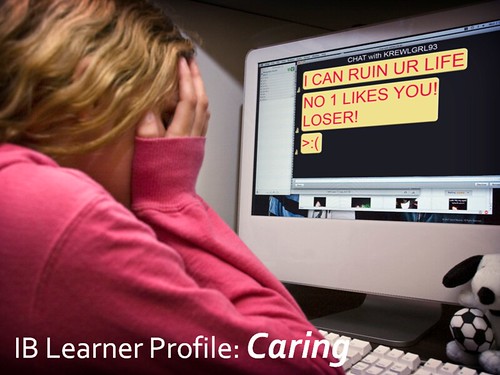
What is cyberbullying, exactly?  Cyberbullying is when a child, preteen or teen is tormented, threatened, harassed, humiliated, embarrassed or otherwise targeted by another child, preteen or teen using the Internet, interactive and digital technologies or mobile phones. It has to have a minor on both sides, or at least have been instigated by a minor against another minor. Once adults become involved, it is plain and simple cyber-harassment or cyberstalking. Adult cyber-harassment or cyberstalking is NEVER called cyberbullying

Many students do not realize that some of their activities, done without thought, can be considered cyber-bullying. Defining online bullying as part of the AUP and having a published procedure for students to follow whenever they feel that they are being bullied will send the message that such activities are not acceptable and will be addressed by those in authority. Knowing what their rights are and how to respond can keep some students from becoming easy targets. Electronic bullying is more problematic since the source can be difficult or impossible to find. Rules in the AUP make it possible for schools to take action whenever it is needed?

We encourage students to use technology that connects them to people electronically and when parents make computers or text messaging available to their children, they have the same responsibility. If they send their child to a school that makes use these media, they have the same responsibility. Parents also have a responsibility to attempt to monitor their children's online behavior, just as they would with their real-world actions.

Most importantly, education about media behavior needs to be an ongoing aspect of students' lives. At school it cannot be confined to a single class or meeting. At home, parents cannot expect that one conversation will be sufficient. We would not expect a one-off conversation to be enough to teach students about sharing or listening to others. Once our school’s AUP becomes clear to us educators we will have an important tool to teach online behavior more effectively.

Monday, May 24, 2010

Your Face on Facebook


Your face on facebook, Watch our for Netizens (or not!)

 Here’s what I’ve read last week.

In China, the Internet is equivalent to streets in democratic countries where people gather to create a voice and spill frustration……

Apparently a homeless man who was living an anonymous life on the streets of China was suddenly in the spotlights when an amateur photographer had taken his picture and posted it on the Internet. This photographer could have been you or me. (Although I haven’t been in China yet). It could be my fiend K, who’s leaving soon for Australia, and posts many pictures of Thailand on Facebook from unknown Thai faces. In the case of the unknown man in China, many more people started taking his picture while he was roaming the streets. People were attracted by the way he dressed and his good looks. As more and more of his pictures started to appear online he became famous and the new celebrity was named ‘Brother Sharp’. It turns out that this man had been roaming the streets for three years. Because he had lost his wife and father in a car accident he suffered from a mental illness. His family was very happy to have found him with the “help” of Internet.

The point here is the power of the net in our societies. Certain actions like this without asking Brother Sharp’s permission may be considered invasion of his privacy. It was also the information spread by the netizens that helped support an unnoticed person. Another new tech word: netizens…..mmmm I like it!

In China many information are still censored and people end up in jail for being too open. People (netizens) get arrested for posting information seen as threats by the government and many pieces of information were deleted from the Net.

How can we create good AUP’s? What are we going to do with our Middle School (netizens) kids if they make the wrong choices in posting information that’s inappropriate? What are the consequences? Can we delete their stuff? 

Sunday, May 9, 2010

Privacy Online


Is there such a thing as privacy online?


Can and will the Internet take over my future? “ Use and abuse” are the first words that come in my mind, but isn’t that with everything we undertake? With learning new skills to participate in society we always have to think of the consequences. “No pain no gain”. Challenge yourself, “trial and error”, gain experiences, and make choices! BE AWARE about the pros and cons. The Internet is made for us so that information can be shared, so we all should be concerned about personal stuff we put on it.


Here at ISB our grade 6 will be going one-to one computer next year where I will be teaching EAL Humanities!!!! This feels good, I’m thrilled, but can we, teachers, parents, and students handle the good, the bad, and the ugly?  Will I as a teacher be able to acquire the necessary knowledge and skills to integrate technology meaningfully into instruction in specific content areas? I am a digital immigrant teacher with an open mind who has passed the behavioral stage, thanks to this course, and although I still feel overwhelmed at times with the speed of learning to use information technology, I am all for it!!!! Strategies to improve my productivity are tested on a daily basis. “Hey I’ve created a Google Doc for our group to work on our EUP Middle School collaborative project.” One of my colleagues says and I feel relieved! Why? Because I know now what a Google Doc is and it will really be an effective tool for our teamwork on this.


This second part of the COETAIL course has these very useful topics that will help with the awareness process of the consequences when we give our kids a school computer to increase their learning. To strengthen a community of practice between students, teachers and parents ISB needs AUPs to provide the proper context for learning to take place.


So how to take the issue of privacy online into account?

Our students all use blogs and are expected to follow the Middle School blogging guidelines. I particularly like the following questions students, (and teachers as well) should use to decide what is appropriate to post on your blog.

Ask yourself:

            Is this something I want everyone to see?

Could someone find me (in real life) based on this information?

            What could be the consequences of this post?

Who is going to look at this, and how are they going to interpret my words?

Do I have a good reason/purpose to do this?

What will I cause by writing this post?

Would I want someone to say this to me?

            Would I want this post to be graded for proper grammar and spelling?

Is this inappropriate, immature or bullying?

Who is the original creator of this work?

Friday, April 30, 2010

Digital Footprint


Because the web is new, we are the first generation and every time we go online we leave a trail. But, who’s watching you? These days we are encouraged to add lots of information about ourselves onto the Internet, which gives lots of opportunities to be creative and develop good skills. Aside from the fun stuff, we always should remember that the Internet is an open environment. Personal information is routinely collected and kept for years and years by companies wanting to sell you stuff and viewed by individuals looking for information about you. So, keep safe and don’t put too much information about yourself online.


It is important to protect your identity and your own digital footprint and your individual actions. We also particularly need to be aware of the other important part of our footprint best described as digital shadow.  These include things like images of you on a surveillances, your bank records, your retail and airline purchase records, telephone records, your medical database entries, information about your web searches, information about credit cards purchases, etc. This means that we need to protect ourselves from identity theft. In this unstructured information world, discipline is needed. One positive side of all is that there will be traces left of individuals for eternity. Future generations will become acquainted with many of us due to what common people are leaving behind. As educators we should teach our kids digital safety.

While checking my Google Reader at Across my Desk from E-Learning Journeys by Julie Lindsay, I found a list of social media etiquette rules for students. If you know someone watching you let’s start by being respectful in social media.

http://www.sociableblog.com/2010/04/01/50-crucial-rules-social-media-etiquette-for-students/


Wednesday, April 7, 2010

Course 1 Reflection Final Project

Course 1 Reflection on the process of creating my final project

 While doing the course I was immediately infused by the possibilities of using information technology to empower the highly talented English language learning students I work with in my grade 8 EAP humanities class. Knowing that I could get the support I needed, not to be afraid of my limitations technology wise, and realizing that my students are living in this digital nation, I leaped into the tech pond. My goal for my students is to give them an opportunity to use content and practice language needed to  “survive” in their core humanities classes and to present their learning to a wider audience, including their mainstream peers. 

Stage 1. Identify Desired results.

Students in grade 8 Humanities class study Africa, with a particular focus on South African history and culture. In order to develop a deeper understanding of the Social Studies outcomes students are asked to complete several activities from options prepared for them.  After completing an activity students are asked to complete a “learning reflection” describing what they learned in the process and explaining the connection to the given Social Studies outcomes.

 Stage 2. Assessments

I wanted to add a new option to the activities that would be both authentic and meaningful. In order to help deeper understand that individual development and identity of a person is related to the time period and society in which the person lives, I came up with the idea of interviewing a native South African and make a documentary style of movie placed on youtube.

 Stage 3. Plan Learning Experiences and Instruction.

Using digital media and environments to communicate and work collaboratively, including at a distance, to support individual learning and contribute to learning of others. (NETS.S)

Within no time I could envision our interview and see how important language and content skills are embedded and how information technology would play an important role. Meeting my students only six days out of eight for one period only wasn’t going to be enough and I finally found purposeful use of my “ready to be used” inside ISB blog. Our interview would take place live at school and we had to come up with relevant questions and used the class blog to communicate information and ideas effectively.

Once prepared, students collaboratively conducted the interview and used flipcameras and digital cameras for the recordings. To determine what acceptable evidence of competency in the outcomes and results, students needed to decide which information was relevant rather than interesting for a documentary movie. Based on this information, students used Creative Commons to find relevant images to help support the information in the movie. Although quite time consuming, because we can only use the Mac Lab, this project creates many learning and language using opportunities because of using information technology. 

Thanks to this course I am grateful that I’ve discovered and gained more confidence to leap in this tech pool so that I can better support ELL’s in their language learning development.

Sunday, March 21, 2010

Learning to Adopt and Adapt Tech for my Classroom


Marc Prensky wonders when technology and schools in the 21st century will get to do it. Knowing that life will be much different by 2100, do I prefer to live life, especially school life, in edutopia? I wouldn’t want to live in an utopia as in the movie “The Beach” or have the life described in the grade 6 novel “The Giver” we have our kids read in class.  

Only until a few months ago I still felt strong and safe teaching the “low tech” style. Working in classes where technology is used more and more, my stage of denial processed gradually into the technology adoption stage of “Dabbling”. Registering for this tech course has done the rest and I’m still amazed how fast I’m adapting and adopting more and more great tech tools for my own teaching. At times I still feel that I am pressing buttons to get through this stage and recognize that writing an essay on a computer (substitution) has nothing to do with “new style” teaching, but using a blog to reflect on this course is and using a blog to allow my students to communicate with me and each other 7/24 is!!! (redefinition). With our students in grade 6 going to one-on –one computers next year, our teaching will be impacted and will force us to adopt more student-centered lessons, especially Problem Based Learning. I agree that simply putting laptops in a classroom isn’t enough, teachers no longer should see themselves in control of the learning process which can be scary for some but by continuing to be willing to learn and I’m happy I stepped on (tech course) board.

Sunday, March 14, 2010

Student NETs Standard


How do I think I meet at least one of the Student NETs standards? While in the planning stage for the interview, I have created a blog through which we can communicate which each other. In class assigned groups began brainstorming ideas about possible interview questions. To allow to continuously working on it, I took their ideas and I started sharing in a blog specially created for this project. The real cool thing about this blog is that students can collaboratively give comments and feedback about deciding what some possible relevant questions are. Each time a comment comes in an e-mail message gets sent to me so that I can reply and give immediate feedback. This way I don’t have to wait for the next class period we’ll meet so it saves time and the students are prepared for their next class. This preparatory interview stage meets the Communication and Collaboration NET standard; Students use digital media and environments to communicate and work collaboratively, including at a distance, to support individual learning and contribute to the learning of others.